BG3 Combat UI Explained: Complete Beginner's Guide to the Battle Interface (with Diagrams)
Complete visual guide to the BG3 combat UI. Every icon, bar, and button explained with diagrams. Action economy, hotbar, portraits, and combat log — master the interface.
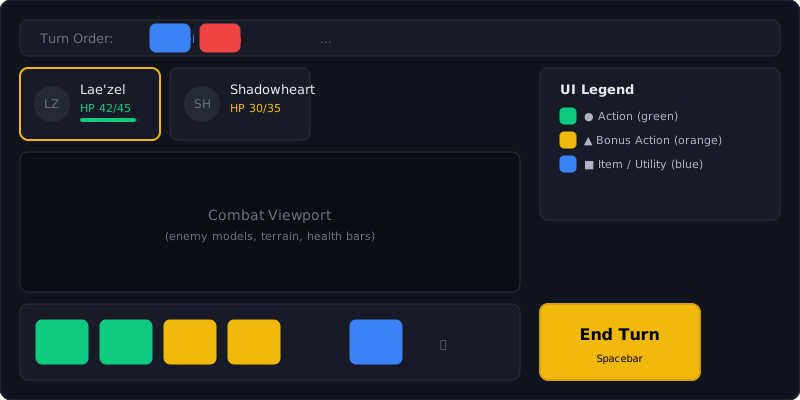
The Combat Interface at a Glance
When combat starts, the BG3 interface transforms. Understanding every element is the difference between confused clicking and tactical mastery.
Bottom Center: The Hotbar (Action Bar)
This is your most important tool. It shows everything your character can do this turn.
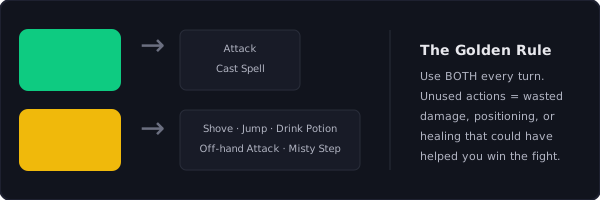
The Action Economy Display:
| Icon | Color | Meaning | Examples |
|---|---|---|---|
| ● Green Circle | Bright green background | Action — your main thing this turn | Attack, Cast Spell, Dash, Hide, Help |
| ▲ Orange Triangle | Orange/amber background | Bonus Action — your secondary thing | Shove, Jump, Drink Potion, Off-hand Attack |
| ◆ Purple Diamond | Purple border (reaction panel) | Reaction — triggers on enemy turns | Opportunity Attack, Shield, Counterspell |
Left Side: Character Portraits

What each portrait shows:
| Element | Location | What It Tells You |
|---|---|---|
| HP Bar | Red bar under portrait | Current health. Numbers show exact HP (e.g., 28/35) |
| Status Icons | Small icons next to portrait | Buffs (green border), debuffs (red border), conditions (yellow) |
| Concentration | Special icon on concentrating character | Shows which spell is being concentrated on |
| Turn Order | Top of screen (initiative tracker) | Shows who acts next. Enemies in red, allies in blue |
| Portrait Border | Glowing border | Your currently selected character |
Critical UI tip: Click on any portrait to switch characters during combat. The turn order at the top shows EVERYONE’s position — allies, enemies, and neutral NPCs. Plan your turns by checking who goes before you.
Bottom Left: Combat Log
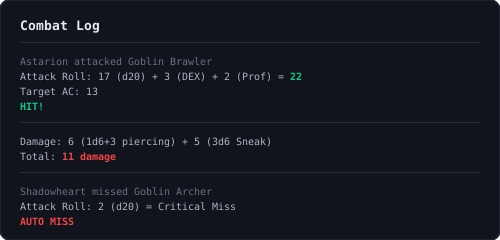
The combat log is the most underused tool by beginners. It shows exactly WHY something happened.
How to read an attack entry:
Astarion attacked Goblin Brawler
  Attack Roll: 17 (1d20) + 3 (DEX) + 2 (Proficiency) = 22
  Target AC: 13
  Hit!
  Damage: 6 (1d6+3 piercing) + 5 (3d6 Sneak Attack) = 11
Hover over any entry to see the full breakdown. This is how you discover you’re missing because of Disadvantage, Low Ground, or an enemy buff.
Right Side: Minimap & Turn Order
The minimap shrinks during combat. Red dots = enemies. Blue dots = allies. Yellow dots = neutral NPCs. The initiative tracker above the minimap shows the exact turn order for the entire encounter.
End Turn Button

The large button on the right side of the hotbar. Before pressing it, check three things:
- ✓ Did you use your Action (green circle)?
- ✓ Did you use your Bonus Action (orange triangle)?
- ✓ Is your character in a good position for next turn?
If you answered “no” to any of these — look again. Unused actions are wasted damage or utility.
How to Set Up Your Hotbar for Maximum Efficiency
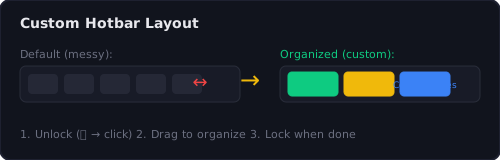
- Unlock the hotbar — Click the small padlock icon on the far right
- Group by frequency — Left side: attacks and cantrips. Middle: limited-use abilities. Right side: items and scrolls.
- Remove clutter — Drag rarely-used items off the bar. You can always find them in your inventory or spellbook.
- Use custom tabs — Create a “Boss Fight” tab with your strongest abilities. A “Utility” tab for out-of-combat spells.
- Lock it — Re-lock the padlock to prevent dragging things mid-combat.
Understanding Enemy Information
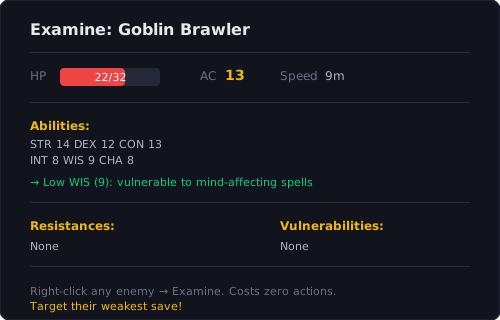
Right-click any enemy → Examine. This opens a panel showing:
- HP and AC — Know how hard they are to hit
- Ability Scores — Target their weakest save (low WIS? Cast Hold Person)
- Resistances/Immunities — Don’t waste fire spells on fire-resistant enemies
- Vulnerabilities — Double damage. Exploit these.
- Conditions/Buffs — Remove enemy buffs with the right spells
This costs zero actions. Examine every enemy at the start of every fight. It’s free information.
Quick Reference: Combat UI Hotkeys
| Key | Action |
|---|---|
| Space | End current character’s turn |
| Tab | Open/close party inventory |
| F5 | Quicksave |
| F8 | Quickload |
| G | Ungroup/Group party |
| Shift | Show enemy vision cones |
| Left Ctrl | Show object labels |
| ` (tilde) | Highlight all characters |
| O | Tactical camera (top-down view) |
Frequently Asked Questions
Why is my bonus action not showing up in the hotbar?
Bonus actions (orange triangle) appear on the right side of your hotbar, separate from main actions (green circle). If you don't see any, you may have already used your bonus action this turn, or your character doesn't have any bonus action abilities available. Also check the 'Common' tab of your hotbar — bonus actions sometimes hide there.
How do I customize the BG3 hotbar?
Click the padlock icon on the right side of the hotbar to unlock it. Then drag spells, items, and abilities to rearrange them. Group your most-used actions on the left side. Lock it again when done to prevent accidental rearrangements during combat.
Was this guide helpful?
Your feedback helps us improve our guides.
Thanks for your feedback!
We've spent 5,000+ hours playing Baldur's Gate 3 across multiple playthroughs. Every guide is updated weekly to reflect the latest patches and community discoveries. Got a correction or suggestion? Let us know.
Continue Reading
Baldur's Gate 3 Beginner Guide: Everything You Need to Know Before Playing
The ultimate BG3 beginner guide covering everything new players need — best class, character creation, combat basics, early game tips, and frequently asked questions.
Read guide → beginnerBG3 Character Creation Guide: Race, Class, Abilities & Backgrounds Explained for Beginners
Complete BG3 character creation guide for beginners. Explains every choice: origin characters, races, classes, ability scores, skills, and backgrounds with simple recommendations.
Read guide → classBest Class for BG3 Beginners: Complete Tier List & Ranking
Discover the best BG3 class for beginners. ranked tier list comparing every class for new players — Fighter, Paladin, Barbarian, and more. Pick the right class for your first playthrough.
Read guide → buildBest BG3 Beginner Builds: 5 Simple & Powerful Character Builds for New Players
5 best BG3 beginner builds that are simple to play yet powerful. Fighter, Paladin, Barbarian, Cleric, and Ranger builds with full level-by-level progression for new players.
Read guide →